

Here's the truth: Google will ban you for things that seem completely normal in eCommerce. No warning. No grace period. Just a vague "policy violation" message that leaves you scrambling.
I'm going to walk you through exactly what to fix BEFORE you connect that Google & YouTube app to your Shopify store. This isn't theory—this is what actually keeps accounts alive.
Why Google Bans Shopify Stores (And Why It Feels So Random)
Google doesn't care that you're new. They don't care that other stores do the same thing. They run your store through automated policy scanners looking for trust signals—and if you're missing them, you're flagged as "high risk."
That's Google's catch-all term for "we don't trust your business is legitimate." It covers everything from missing contact info to unclear shipping policies to looking like every other dropshipper.
Step 1: Build Trust Pages That Pass Google's Scanner
Google reads your About, Contact, Shipping, and Returns pages like a compliance officer, not a customer. If anything feels vague, inconsistent, or copy-pasted, you're getting flagged.
✅ DO THIS:
- Business name (exactly as it appears everywhere)
- Email address (not just a contact form)
- Phone number (Google heavily weights this—yes, even if you don't want calls)
- Physical business address
- Who you are (not "we're passionate about products")
- Where you're based
- How orders are fulfilled (be transparent about suppliers/partners)
- Why customers should trust you
- Where do you ship? (Be specific: "USA only" or list countries)
- How long does shipping take? (Processing time + transit time)
- Who pays return shipping? (Customer? You? Both?)
- What's your refund policy? (Refund to original payment? Store credit only?)
- Any restocking fees? (State the percentage clearly)
- What condition must returns be in? (Unworn? Original packaging?)
- Do you require photos for damages/defects?
❌ DON'T DO THIS:
- "We ship fast!" (Google needs numbers: 2-3 business days processing, 5-7 day shipping)
- "Easy returns" (Google needs specifics: 30-day window, customer pays return shipping, etc.)
- Hiding your phone number or address
- Using only a contact form
- Copy-pasting generic policy templates that conflict with your actual practices
- Making policies feel "negotiable" or friendly without being specific
Step 2: The Business Address Problem (And What to Do If You Don't Have One)
Here's where people panic: Google requires a physical business address.
"But Veronica, I run my business from home and don't want to publish my home address!"
I get it. Here's what actually works:
✅ DO THIS:
- Register an LLC or sole proprietorship and use that registered address
- This can still be your home address, but it's now a "business address"
- Services like Regus, Davinci Virtual, or local coworking spaces offer business addresses
- Costs $20-$100/month
- Gives you mail forwarding and a legitimate business location
- Format it like a suite number: "123 Main St, Suite 456" (not "PMB 456")
- Google accepts this if it looks like an office, not a PO Box
❌ DON'T DO THIS:
- Use a PO Box (instant red flag)
- Leave the address field blank
- Use a fake address
- Use only "Online Business" or "USA" as your location
- Hide your address entirely (even if your theme allows it)
Step 3: Make Sure Your Product Feed Matches Your Website Exactly
Google's scanners compare your product feed data (what the Google app sends to Merchant Center) against your live website. If anything doesn't match, you're flagged.
✅ DO THIS:
- Price in feed = price on product page (including variants)
- Availability in feed = availability on site (in stock/out of stock)
- Sale prices have clear end dates
- Shipping costs match your shipping policy
- Product titles and descriptions are consistent
- Understand that supplier stock updates faster than your feed sometimes
- Pause products that frequently go out of stock
- Don't advertise products you can't consistently fulfill
❌ DON'T DO THIS:
- Show different prices on Google vs. your site (even temporarily)
- Advertise products as "in stock" when they're not
- Change prices frequently without updating the feed
- Use countdown timers that create fake urgency
- Show "limited stock" warnings that aren't true
Step 4: Set Up Google Shipping Settings BEFORE You Sync Products
Don't just connect the app and hope for the best. Configure shipping in Google Merchant Center manually.
✅ DO THIS:
- Flat rate: $9.99 (or whatever you charge)
- Free shipping threshold: $75-$100 (not $50—too low triggers suspicion)
- Transit time: 5-7 business days (be conservative)
- Processing time: 2-3 business days (be realistic)
Match this EXACTLY to your Shipping Policy page.
❌ DON'T DO THIS:
- Leave shipping settings blank or on "automatic"
- Advertise "free shipping" without clearly stating the minimum
- Promise 2-day shipping if you're dropshipping from China
- Change shipping costs after customers click your ad
Step 5: The Dropshipping Trust Signal Fix
Google doesn't ban dropshipping. Google bans low-trust dropshipping operations that look like fly-by-night scams.
If you're dropshipping, you need to signal: "We're a real business that stands behind these products."
✅ DO THIS:
Add a "How We Fulfill Orders" or "Our Quality Promise" section to your About page:
Example:
"We partner with vetted U.S.-based suppliers and warehouses to fulfill your orders quickly and reliably. Every product is quality-checked before shipping, and our team handles all customer service and returns directly. You're buying from us—not a marketplace."
This small addition tells Google:
- You're transparent about your model
- You take responsibility for quality
- You're not just a middleman
❌ DON'T DO THIS:
- Use the exact same product photos as 50 other stores
- Copy-paste supplier descriptions word-for-word
- Pretend you manufacture products if you don't
- Hide how fulfillment works
Step 6: Verify Your Website in Google Merchant Center
This seems basic, but people skip it.
✅ DO THIS:
- Go to Google Merchant Center (not just the Shopify app)
- Claim and verify your website URL
- Confirm your business info matches your site EXACTLY (business name, address, phone)
- Set up tax settings (even if you use Shopify's auto-tax)
- Review Diagnostics for any warnings BEFORE uploading products
❌ DON'T DO THIS:
- Assume the Shopify app handles verification automatically
- Upload products before verifying business details
- Ignore warnings in the Diagnostics tab
Step 7: Check for Red-Flag Language Anywhere on Your Site
Google scans your ENTIRE site—not just product pages. Certain phrases trigger instant suspicion.
❌ REMOVE THESE IMMEDIATELY:
- "Get rich quick"
- "Miracle cure" or health claims (especially for supplements, skincare, beauty)
- "Limited time" (unless it's genuinely true and provable)
- "Make money fast"
- "Lose weight without exercise"
- Unverifiable "as seen on TV" claims
- Before/after photos without disclaimers
- Countdown timers on every product
✅ DO THIS INSTEAD:
- Use real customer reviews (Yotpo, Judge.me, Loox)
- Share actual results with disclaimers ("Results may vary")
- State facts, not hype
- Let your products sell themselves with quality descriptions
The Bottom Line: Google Wants Boring Clarity, Not Marketing Magic
Here's what frustrates people: The tactics that work on Facebook and TikTok get you banned on Google.
| Google Rewards | Google Punishes |
|---|---|
| Clear policies | Hype |
| Specific information | Vagueness |
| Transparent business practices | Inconsistency |
| Consistent data | Missing trust signals |
| Legitimate contact details | Anything that feels "too good to be true" |
Before you connect that Google & YouTube app, spend 2-3 hours making your store Google-proof. It's not sexy work, but it's the difference between launching ads successfully and spending weeks appealing a suspension.
What to Do If You're Already Suspended
If you're reading this too late and already got the dreaded "products aren't shown to customers" message:
- Don't panic and resubmit immediately—Google will reject you again
- Fix EVERY issue I mentioned above first
- Screenshot your changes
- Request a review with a specific explanation of what you fixed (not an apology)
This is the dreaded red box in your Shopify store Google & YouTube sales channel.
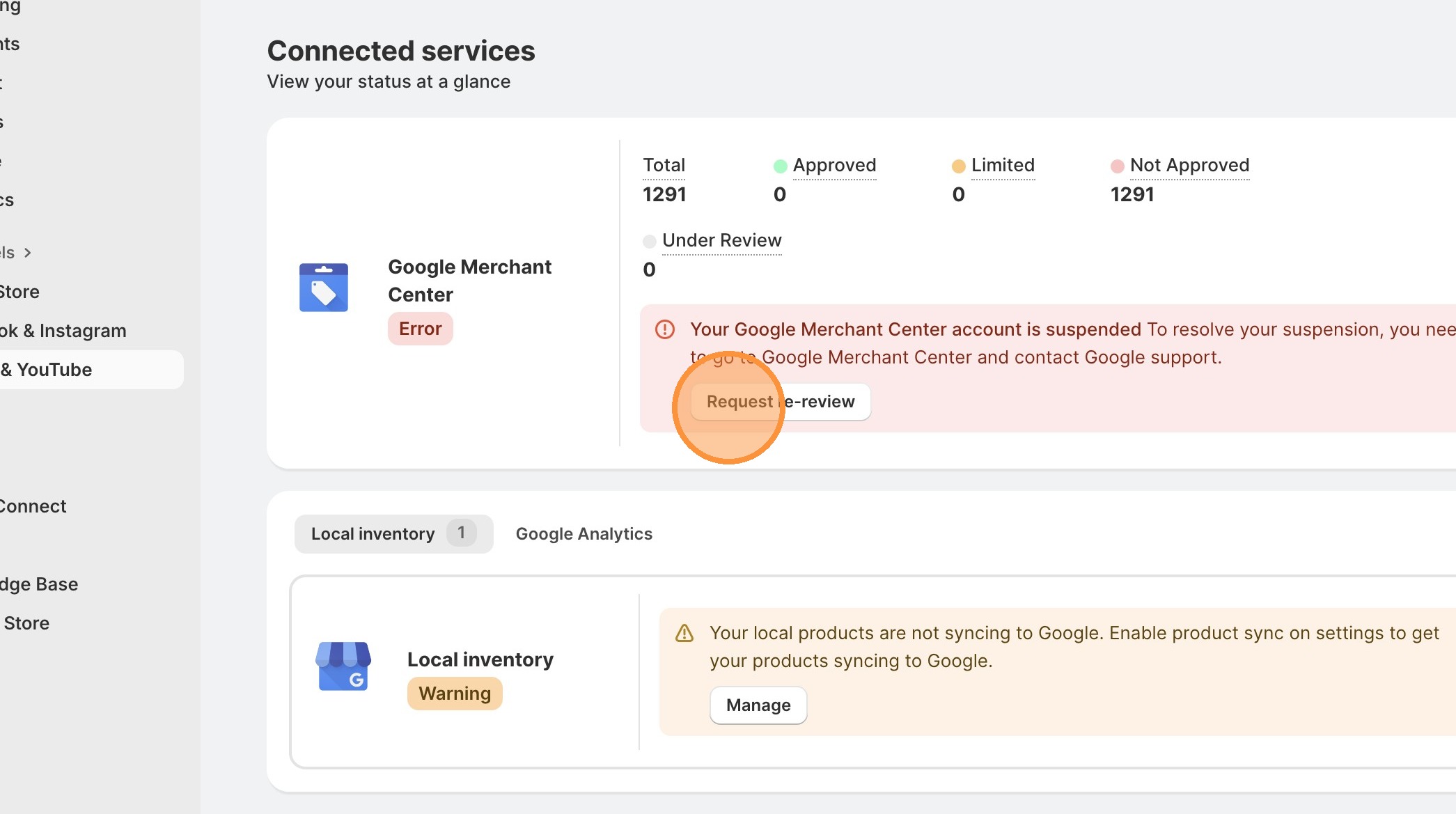
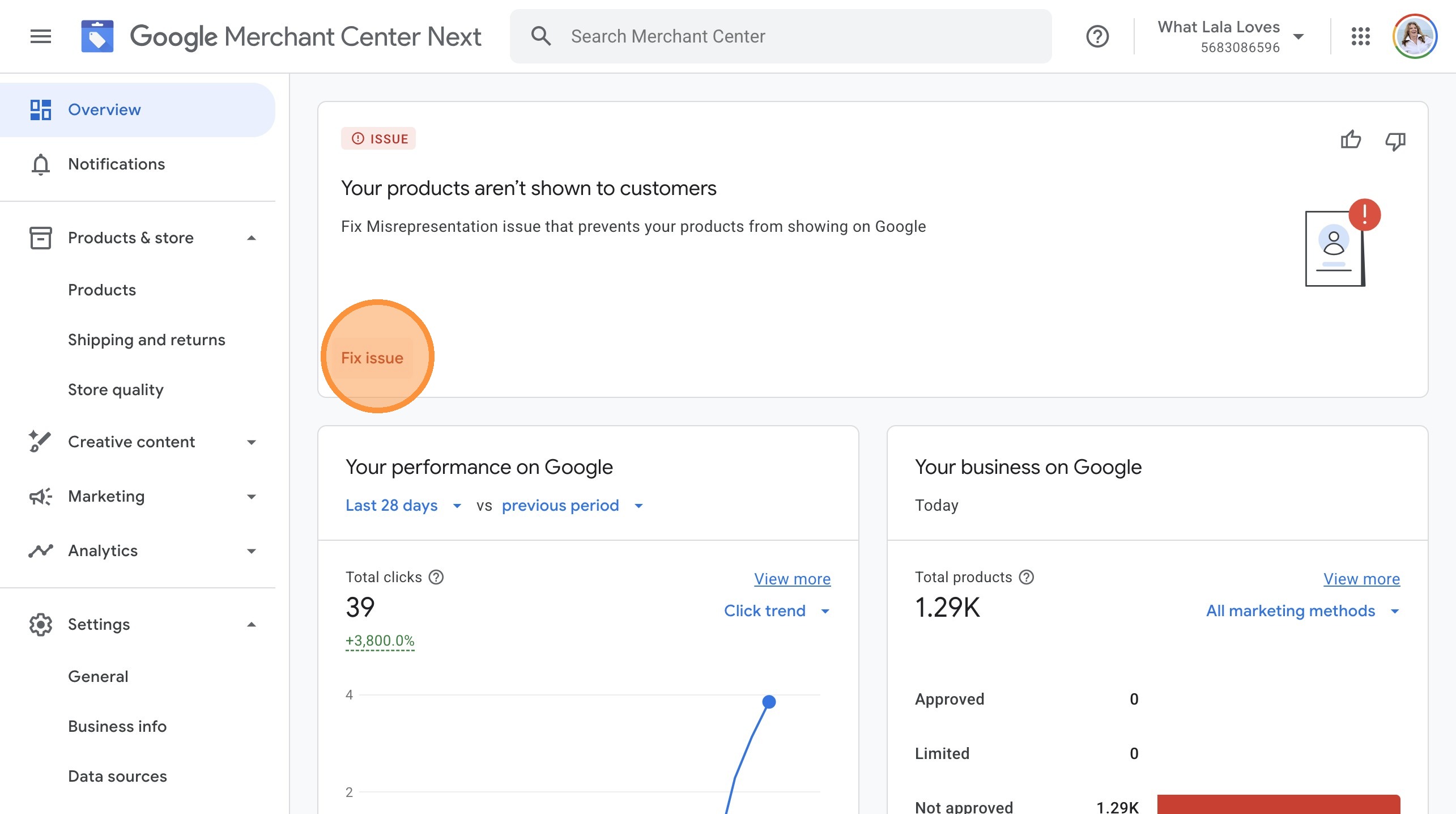
Once you click on the Review button, you will be pushed to the Google Merchant account. Click on "Fix issue" button but that will still not always be very clear what is the issue.
"I've updated my Shipping Policy to include specific processing times (2-3 business days) and transit times (5-7 business days). I've added a phone number and business address to my Contact page. I've clarified my returns process to state that customers pay return shipping and must request returns within 30 days."
"I'm sorry, please reconsider, I'll do better."
If you see this in your Google Merchant center, it will list all of your transgressions.
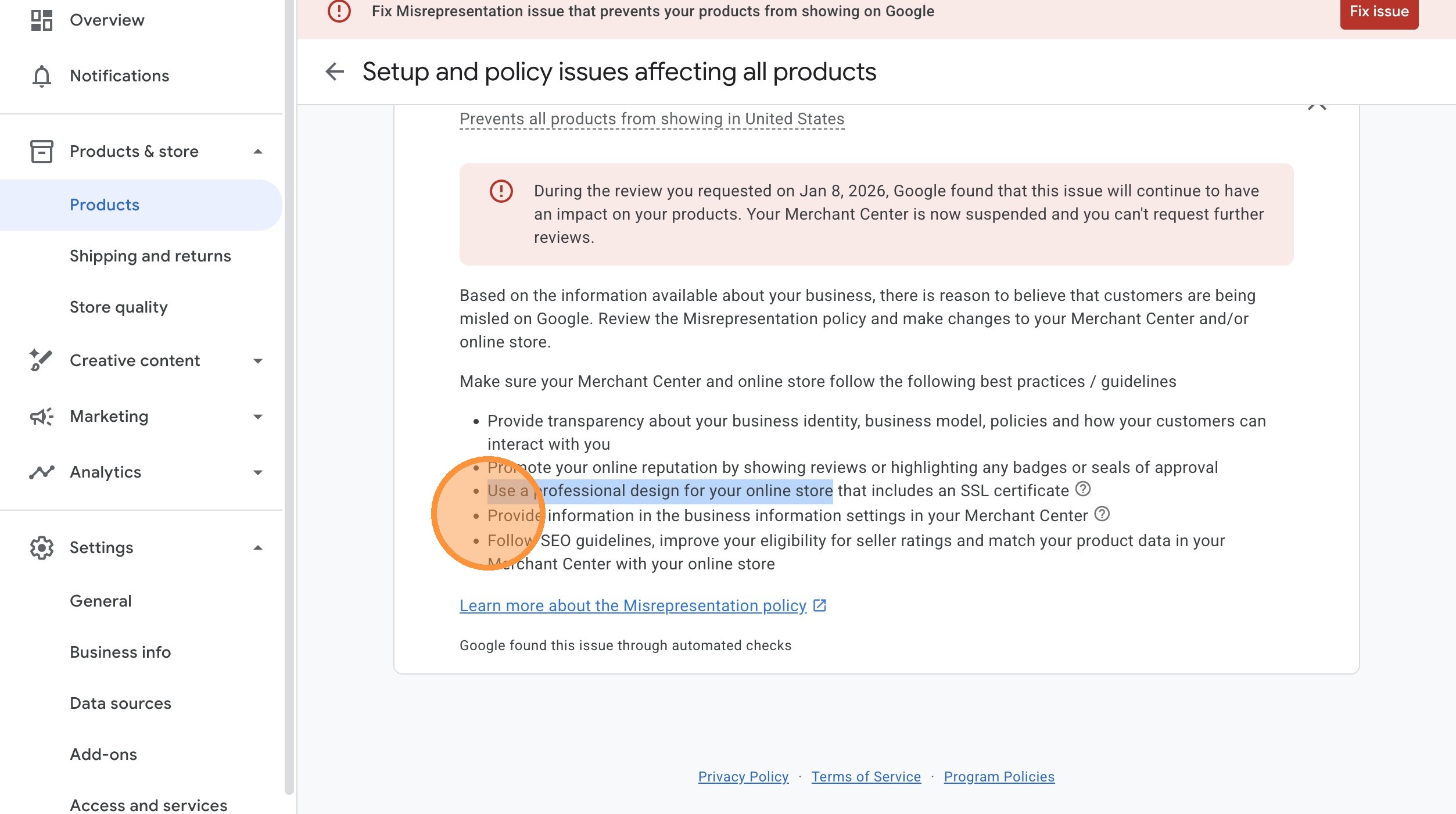
Sometime it is easier to start fresh.
Clean Restart (Most Reliable)
This is what most suspended stores do.
What this means:
- New Merchant Center
- New Google account
- Clean domain history (or subdomain)
- Site fixed before connecting to Google
You cannot reuse:
- The same Merchant Center ID
- The same misrepresenting structure
You can reuse:
- The store
- The products
- Shopify
- The brand (if corrected)
This is often faster and safer.
🎯 Google Compliance Checklist (Complete BEFORE Connecting Google & YouTube App)
Contact Page Setup
About Page Content
Shipping Policy Specifics
Returns Policy Clarity
Product Feed & Website Alignment
Google Merchant Center Setup
Red-Flag Content Removal
Final Quality Checks
Frequently Asked Questions
Misrepresentation is Google's catch-all term for "we don't trust your business is legitimate." It typically means one or more of these issues: missing contact information (especially phone numbers), vague or inconsistent shipping/returns policies, unclear business identity, or a store that looks like a low-trust dropshipping operation. Google's automated scanners look for trust signals, and if they're missing, you get flagged—even if you have a legitimate business. The fix is adding specific, verifiable business details and crystal-clear policies.
You need a physical business address, but it doesn't have to be your personal home address. You have three legitimate options: (1) Register your business as an LLC or sole proprietorship and use that registered address (can still be your home, but it's now a "business address"), (2) Get a virtual office address from services like Regus or Davinci Virtual ($20-$100/month), or (3) Use a UPS Store mailbox formatted as a suite number (e.g., "123 Main St, Suite 456" not "PMB 456"). Never use a PO Box—that's an instant red flag. Google needs to verify your business exists at a real location.
Technically yes, but it's risky. If you're using the exact same photos and descriptions as 50 other stores, Google sees this as a low-trust signal. You don't need to take all your own product photos, but you should: (1) Add at least one unique lifestyle photo or styled shot, (2) Rewrite product descriptions in your own voice with your brand's personality, and (3) Include unique details like sizing guidance, styling tips, or care instructions. The goal is to look like a real brand that curates and stands behind products, not a generic middleman copying supplier content.
Extremely specific. Google wants exact numbers and clear terms, not friendly vague language. Your shipping policy must state: processing time (e.g., "2-3 business days"), transit time (e.g., "5-7 business days"), shipping cost (e.g., "$9.99 flat rate" or "Free shipping on orders $75+"), and shipping regions (e.g., "USA only"). Your returns policy must state: return window (e.g., "30 days"), who pays return shipping, refund method (original payment or store credit), any restocking fees (e.g., "20%"), condition requirements (e.g., "unworn with tags"), and whether you require photos for damages. If your policy says "easy returns" or "fast shipping" without these details, Google flags it as unclear.
The Google & YouTube Shopify app is just the connector—it syncs your product feed from Shopify to Google Merchant Center. Google Merchant Center is where Google actually reviews your products, enforces policies, and determines if your products can show in Google Shopping, YouTube Shopping, and Google Ads. Many people make the mistake of only using the Shopify app and never logging into Google Merchant Center to verify their website, configure shipping settings, check diagnostics, or review policy violations. You need to set things up properly in Google Merchant Center BEFORE syncing products through the Shopify app.
No, Google doesn't ban dropshipping—it bans low-trust dropshipping operations that look like fly-by-night scams. The issue isn't your fulfillment model; it's whether you look like a legitimate business that stands behind your products. To pass Google's trust checks while dropshipping: (1) Be transparent about how orders are fulfilled (add a "How We Fulfill Orders" or "Quality Promise" section), (2) Use unique product descriptions and at least some unique photos, (3) Have clear, specific policies, (4) Include complete contact information with a phone number, and (5) Show you're a real brand, not just a middleman reselling supplier inventory. Many successful dropshipping stores use Google Shopping—they just present themselves as professional brands.
You can request a review immediately, but don't rush it. If you resubmit without fixing the actual issues, Google will reject you again—and repeated rejections make future appeals harder. Instead: (1) Fix EVERY issue mentioned in this article first (contact info, policies, feed alignment, trust signals), (2) Screenshot your changes as proof, (3) Wait 48 hours to ensure changes are live and indexed, then (4) Request review with a specific explanation of what you fixed (not an apology). Example: "I've updated my Shipping Policy to include specific processing times (2-3 business days) and transit times (5-7 business days). I've added a phone number and business address to my Contact page. I've clarified my returns process to state customers pay return shipping and must request returns within 30 days." Google prefers specific fixes over generic promises.
Yes. Google heavily weights phone numbers as a trust signal—it's one of the easiest ways to prove you're a real business. You have options if you don't want to handle calls personally: (1) Use a Google Voice number that forwards to voicemail with instructions to email instead, (2) Use a business line service that transcribes voicemails and emails them to you, (3) Hire a virtual assistant to answer calls during business hours, or (4) Simply add the number and state "Email is preferred for fastest response" on your Contact page. The number just needs to exist and be listed—you can still direct most customer service to email. But not having a phone number at all is a major red flag that often triggers misrepresentation violations.
Google requires that your product feed matches your website in real-time. If you frequently change prices or run flash sales, you need to ensure your feed updates accordingly. For Shopify stores using the Google & YouTube app, the feed typically syncs every 24 hours—but Google can check your live site at any time. Best practices: (1) Avoid changing prices more than once per day, (2) If running sales, update the sale end date in Shopify so it syncs to Google, (3) For frequently out-of-stock items (common with dropshipping), pause those products in Google Merchant Center rather than advertising something you can't fulfill, and (4) Use Shopify's inventory tracking to automatically show "out of stock" rather than manually hiding products. The key is consistency—what Google sees in your feed must match what customers see on your site.
You can, but be careful. Most "Google Ads experts" or "GMC specialists" will charge $500-$2,000 to do exactly what this article outlines: rewrite your policies, add contact information, and request review. The work itself isn't complicated—it's just specific. If you want to hire help: (1) Make sure they have proven experience with Google Merchant Center policy violations (ask for case studies), (2) Understand that no one can "guarantee" reinstatement—Google makes the final call, (3) Expect to pay $300-$1,000 for legitimate help, not $2,000+ for basic policy rewrites, and (4) Use this article as your checklist to verify they're actually fixing the root issues, not just submitting appeals. Honestly, most entrepreneurs can handle this themselves in 2-3 hours—it's not technical, it just requires attention to detail and following Google's compliance requirements exactly.
Your business should fund your life, not fight with Google's bots.
Do this prep work once, do it right, and you'll never have to think about it again.
Now go make your store Google-proof and start selling.
