

This guide provides a step-by-step process for creating and managing author metaobjects in Shopify, which enhances your store's content by allowing you to showcase authors effectively. By following these instructions, you can add essential details like names, descriptions, images, and links to authors, improving customer engagement and trust. This is particularly useful for blogs or product descriptions where author credibility matters.
1. Navigate to Settings in your Shopify dashboard

2. Click "Metafields and metaobjects"

3. or in your Shopify dashboard, navigate to "Contents" > Click "Metaobjects"

4. Click "Add definition"

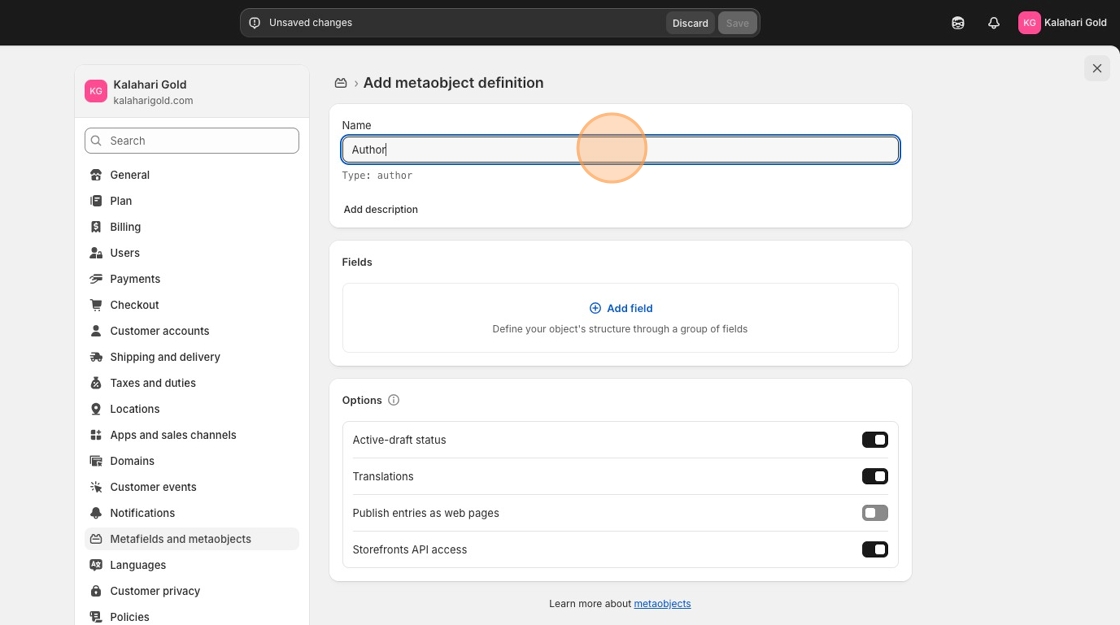
5. Name your metaoject - Click the "Name" field and add AUTHOR
6. Now you are going to add more definitions. Click "Add field"

7. Click "Single line text" & add.

8. Name of definitions: Add NAME to the field. - Click "Add"

9. Click "Add field"

10. Click "Multi-line text"

11. Click the "Name" field and add DESCRIPTION to the field.

12. Click "Add"

13. Click "Add field"

14. Click "File"

15. Click "Add" and add IMAGE to the field.

16. Click "Add field"

17. Click "Link"

18. Add to definition: add URL to the field. - Click "List of values"

19. Click "Add"

20. Click "Save"

21. Click here.

22. Click "Blog posts" in the 'Metafield definitions'

23. Click "Add definition"

24. Click the "Name" field. Type "Author"

25. Click "Select type"

26. Click "Metaobject"

27. Click reference

28. Click "Author"

29. Click "Save"

30. Click here.

31. Click "Blogs0"

32. Close the window.

33. Navigate to 'Content' and Click "Metaobjects"

34. In the 'Metaobjects' setting - Click "Author"

35. Click "Add entry"

36. Click the "Name" field and type in the name of the author

37. Click "Edit URL metafield" - this is the link to any of the author's social media, amazon link or anywhere else the author has a profile.

38. Click the "Description" field. Type in the bio of the author.

39. Click "Select file" and add a bio photo of the author.

Here is a link to the next step:
Customize Blog Post Author and Description on Shopify Homepage (Metaobject)
