

By Veronica Jeans | 7-minute read
Stop leaving 40-60% of your potential discount redemptions on the table—here's how to get your promotions in front of millions of shoppers in under 5 minutes
The Discount Visibility Problem Nobody Talks About
Here's the thing most Shopify store owners get wrong about discounts: they create brilliant promotions, set up compelling offers, and then... publish them only to their website. That's like hosting a sale in a room with no doors. You're hoping customers magically find you instead of meeting them where they already are.
When you publish your discounts to sales channels, Shop, Google, TikTok, Pinterest, Facebook, and Instagram, you're not just expanding reach. You're positioning your offers in front of high-intent shoppers who are actively browsing, discovering, and buying. This is the difference between a promotion that generates $2K and one that generates $8K with the exact same discount.
The Strategic Reality: Stores that publish discounts across multiple sales channels see 40-60% higher redemption rates compared to store-only promotions. That's not marginal improvement, that's the difference between a discount that pays for itself and one that actually scales your business.
This guide walks you through the exact 7-step process I teach my coaching clients to publish Shopify discounts to every sales channel that matters. No fluff, no theory, just the tactical implementation that works.
Before You Start: What You Need
- Active Shopify store with admin access
- At least one discount code created in your Shopify dashboard (if you haven't created one yet, go to Discounts → Create Discount first)
- Sales channels installed in your Shopify admin (Shop, Google & YouTube, Facebook & Instagram, Pinterest, TikTok)
- Product catalogs synced to those channels (the discount can only appear on channels where your products are available)
Pro tip: If you haven't set up sales channels yet, do that first. Go to Sales Channels → Add Channel in your Shopify admin. Shop is free and takes 5 minutes - start there.
Step-by-Step: How to Publish Discounts to Sales Channels
Step 1: Access Your Shopify Discounts Dashboard
From your Shopify admin panel, click "Discounts" in the left sidebar navigation menu. This opens your discount management hub where all your promotional codes live.
Why this matters: This is your command center for all promotions. If you're managing multiple discounts (which you should be for different customer segments), this is where you'll organize and activate them strategically.

Step 2: Search for Your Discount Code
Use the search bar at the top of the Discounts page to quickly locate the specific discount you want to publish. Type the discount code name or filter by status (active, scheduled, expired).
Strategic note: If you're running seasonal promotions, use clear naming conventions like "HOLIDAY2025-20" so you can find and reactivate them quickly year after year. Past me thanks present me for this organizational sanity.
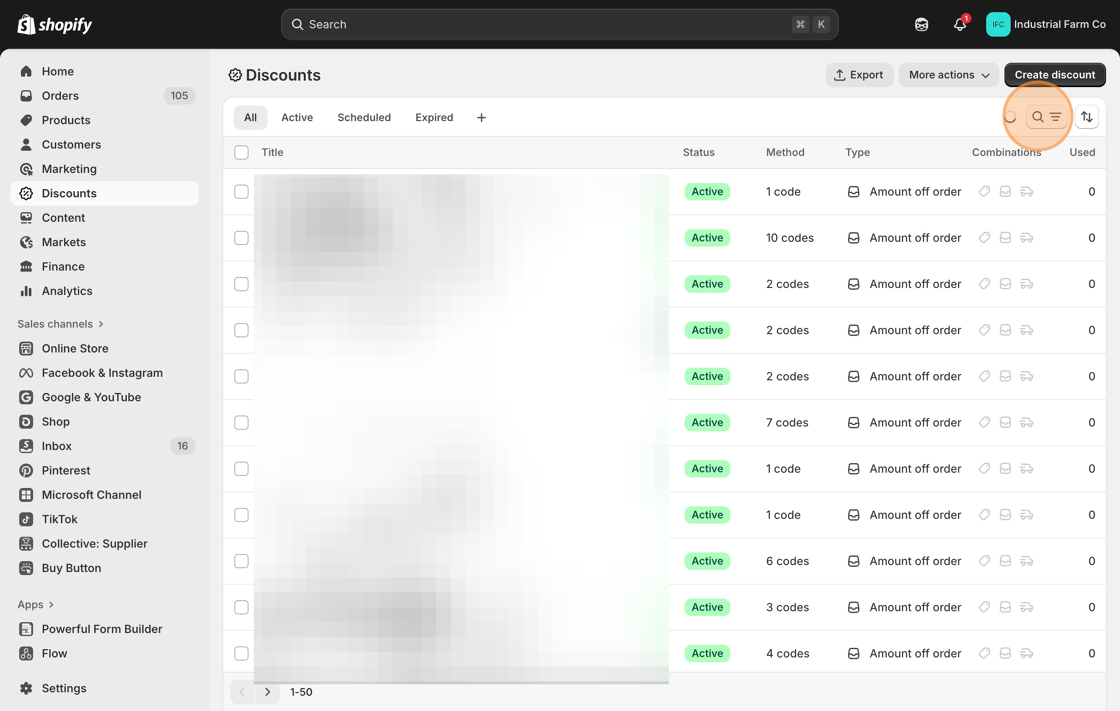
Step 3: Select the Discount You Want to Publish
Click on the discount code to open its detailed settings page. This is where you'll see all the parameters: discount value, usage limits, customer eligibility, active dates, and current publication status.
Quick audit: Before publishing to sales channels, verify your discount settings are correct. Publishing a poorly configured discount to millions of shoppers is... not the visibility you want.

Step 4: Open the Sales Channel Menu
Look for the three-dot menu (⋯) at the top right corner of the discount details page. This is your actions menu for channel management.
Click on these three dots to reveal the dropdown options.

Step 5: Enable Sales Channel Access
From the dropdown menu, click "Allow sales channel access". This unlocks the channel selection interface, where you can choose which platforms will display your discount.
Behind the scenes: This action doesn't publish your discount yet. It just opens the gates. You're about to choose exactly where your promotion appears, which gives you control over audience targeting and channel strategy.

Step 6: Select Your Priority Sales Channels
Now you'll see a list of all available sales channels connected to your Shopify store. Select the channels where you want your discount to appear.
High-priority channels to select:
- Shop – Shopify's native marketplace with millions of engaged shoppers. Zero commission fees. This is non-negotiable.
- Google & YouTube – Your discount appears in Google Shopping and YouTube product feeds, capturing high-intent searchers.
- Pinterest – Incredible for visual products, home decor, fashion, and lifestyle. Long content lifespan means your discount gets discovered for weeks.
- TikTok – Explosive reach for viral-capable products and younger demographics (18-40). TikTok Shop integration is a game-changer.
- Facebook & Instagram – Standard visibility for Meta's massive user base. Your discount shows up in Shopping features and shoppable posts.
Strategic prioritization: Don't just check every box blindly. Focus on channels where your audience actually shops. If you're selling industrial equipment to 50-year-old contractors, TikTok probably isn't your priority, but Google definitely is. If you're selling aesthetic home decor to millennial women, Pinterest should be your first click after Shop.
Critical checkpoint: Make sure the products to which your discount applies are actually published on these channels. A discount on TikTok means nothing if your product catalog isn't synced there. Go to Sales Channels → [Channel Name] → Products to verify availability before publishing.

Step 7: Publish Your Discount
Click the "Publish" button to activate your discount across all selected sales channels.
That's it. Your promotion is now visible to millions of potential customers across multiple platforms, working for you 24/7.
What happens next: Shop displays your discount within minutes. Google & YouTube take 24-48 hours to review and index. TikTok and Pinterest typically show changes within 2-4 hours. Facebook and Instagram are nearly instant once your catalog is synced. Don't panic if it's not immediate. Different channels have different processing speeds.

Beyond Basic Publishing: Strategic Discount Channel Management
Not Every Discount Deserves Every Channel
Here's where most people go wrong: they publish everything everywhere, training their audience to wait for discounts and devaluing their brand. Strategic channel selection means matching promotion type to platform purpose.
Publish to ALL channels:
- Customer acquisition campaigns (first-time buyer discounts)
- Seasonal promotions (Black Friday, holiday sales)
- Flash sales designed for maximum reach
- New product launch promotions
Keep OFF sales channels (email/SMS only):
- VIP customer rewards (you want exclusivity, not broad visibility)
- Cart abandonment recovery codes (specific to individual customers)
- Loyalty program milestones (earned benefits, not open promotions)
- Win-back campaigns for lapsed customers
Timing Your Channel Publishing
Set up your discount with scheduled start/end dates, then publish to channels immediately. The channels will automatically activate and deactivate based on your schedule. This means you can set up your entire promotional calendar weeks in advance and let automation handle the timing.
The Channel Performance Audit
After running a promotion across channels, check your analytics (Analytics → Reports → Sales by Channel). This tells you which platforms actually converted. If TikTok drove 200 visitors but zero sales while Pinterest drove 50 visitors with 8 conversions, that's actionable intelligence for your next campaign. Double down on what works; don't spread yourself thin across channels that don't perform for your specific products.
Common Mistakes That Kill Discount Performance
Mistake #1: Publishing Without Verifying Product Availability
You publish a discount to TikTok, but your products aren't in your TikTok catalog. Result: crickets. Always verify that products are published to channels before publishing discounts there.
Mistake #2: Forgetting Shop Entirely
Shop is Shopify's native marketplace with millions of high-intent shoppers and zero commission fees. Yet most store owners completely ignore it because they don't realize it exists. This is low-hanging fruit! Always publish major promotions to Shop.
Mistake #3: Using Generic Discount Codes
If you're publishing across channels, use codes that tell you where conversions came from. "SAVE20" tells you nothing. "TIKTOK20" or "PINTEREST20" gives you attribution data. Better yet, create unique codes per channel for the same discount value so you can track channel performance precisely.
Mistake #4: Publishing Expired Promotions
Clean up your discount dashboard regularly. Expired promotions still published to sales channels create customer confusion and erode trust. If a discount is done, unpublish it from channels immediately. Set calendar reminders for promotion end dates.
Frequently Asked Questions
Why should I publish discounts to sales channels instead of just my Shopify store?
Publishing discounts to sales channels multiplies your promotion's visibility exponentially. When you publish to Shop, you reach millions of high-intent shoppers browsing the app. Google & YouTube integration puts your offers in front of people actively searching for products like yours. TikTok and Pinterest users discover your deals while in discovery mode, before they even know your brand exists.
This is about meeting customers where they already are, not hoping they stumble onto your website. Stores that publish discounts across channels typically see 40-60% higher redemption rates compared to store-only promotions. That's not marginal improvement, that's the difference between a promotion that breaks even and one that actually scales your business.
Which sales channels should I prioritize for discount publishing?
Always start with Shop - it's Shopify's native marketplace with millions of engaged shoppers and zero additional fees. Next, prioritize channels where your target audience actually hangs out:
- Google & YouTube: Essential for high-intent buyers actively searching for products
- TikTok: Works phenomenally for visual products and younger demographics (18-40)
- Pinterest: Drives consistent long-term traffic for home decor, fashion, and lifestyle products
- Facebook & Instagram: Table stakes for most brands with broad demographic reach
The mistake most people make is spreading too thin across channels they don't actively manage. Start with 3-4 channels you can maintain, then expand once you've proven performance.
Do I need to create separate discounts for each sales channel?
No, and this is the beauty of Shopify's system. You create ONE discount code in your Shopify dashboard, then simply publish it to multiple channels simultaneously. The same discount code works across all platforms, which means cleaner tracking, easier management, and a consistent customer experience.
You're not juggling platform-specific codes or dealing with attribution nightmares. One code, maximum reach, minimal complexity. If you want channel attribution, create unique codes with channel identifiers (TIKTOK20, PINTEREST20) but configure them identically.
How long does it take for discounts to appear on sales channels after publishing?
Timing varies by channel:
- Shop: Within minutes (nearly instant)
- Facebook & Instagram: Immediate once the catalog is synced
- TikTok & Pinterest: 2-4 hours typically
- Google & YouTube: 48-72 hours (they review and index promotions)
If your discount isn't showing after these timeframes, check that your product catalog is properly connected to each channel and that the discount applies to products in that catalog. The most common culprit is product availability settings. Make sure that the products to which your discount applies are published on those channels.
Can I schedule discounts to automatically publish to sales channels at specific times?
Partially. Shopify allows you to set start and end dates for discounts, and once you've published a discount to sales channels, it will automatically activate and deactivate based on those dates. However, you can't schedule the initial publishing action itself—you need to manually enable sales channel access.
The workaround: Set up your discount with future start dates, publish it to channels immediately, and let the schedule handle activation. For recurring promotions (like monthly flash sales), save time by duplicating previous discounts that are already configured with sales channel access, then just update the dates and discount specifics.
What's the biggest mistake people make when publishing discounts to sales channels?
Forgetting to publish to Shop. Seriously, this one channel alone can drive 20-30% additional sales for promotions, and most store owners completely ignore it because they don't realize it exists or understand what it does.
The second biggest mistake is publishing discounts without verifying that the actual products are available on those channels. You can publish a discount to TikTok all day long, but if your products aren't in your TikTok catalog, nobody sees it.
Always cross-check: Discount created → Products available on channel → Discount published to channel. That's the sequence that works.
Will publishing to more sales channels cost me extra fees?
Shop is completely free with zero commission fees. It's Shopify's native platform designed to benefit merchants. The other channels (Google, Facebook, Instagram, Pinterest, TikTok) don't charge you to display discounts, but their standard transaction and advertising rules apply:
- Organic channel listings: Typically, no additional fees beyond normal payment processing
- Paid advertising: Standard ad costs apply if you're running campaigns
- TikTok Shop: Commission fees apply (typically 2-8% depending on category)
The publishing action itself is free—you're just making your promotions visible where customers already are. Its distribution, not a new expense.
Should I publish every discount I create to all sales channels?
No, be strategic. Flash sales, seasonal promotions, and customer acquisition offers should absolutely hit all channels for maximum reach. But VIP customer rewards, loyalty program discounts, or segment-specific promotions should stay controlled.
You don't want to train your entire audience to wait for discounts, and you don't want your most valuable customers seeing you offer better deals to strangers. Create a promotion calendar: broad-reach discounts go to all channels, strategic retention offers stay in email and SMS.
Intentionality beats desperation every time. Your best customers should feel special, not like they're missing out on better deals you're advertising to everyone else.
How do I unpublish a discount from sales channels?
Go to Discounts → Select the discount → Click the three-dot menu (⋯) → Click "Manage sales channel access" → Uncheck the channels you want to remove → Save. The discount will be removed from those channels within a few hours (timeframes vary by channel, similar to publishing delays).
Always unpublish expired or completed promotions to avoid customer confusion and support tickets asking about discounts that no longer work.
Can I track which sales channel my discount redemptions came from?
Yes, through your Shopify Analytics. Go to Analytics → Reports → Sales by traffic source to see which channels drove conversions. For more precise attribution, create channel-specific discount codes (TIKTOK20, INSTA20, PINTEREST20) instead of using one code across all channels.
This gives you exact performance data so you can double down on high-performing channels and deprioritize or optimize underperforming ones. Data beats guesswork every time.
The Bottom Line: Visibility Drives Redemption
Publishing discounts to sales channels isn't optional if you're serious about scaling. It's the difference between a promotion that limps along at 100 redemptions and one that explodes to 500+ because you met customers where they're already shopping.
This process takes less than 5 minutes per discount. The setup is simple. The impact is exponential. And once you've done it a few times, you'll never publish a store-only discount again—because you'll have seen the revenue data that proves multi-channel visibility works.
Your implementation checklist:
- Set up sales channels if you haven't already (start with Shop, Google, and one social channel)
- Verify your product catalogs are synced to those channels
- Create your discount code with clear naming and proper parameters
- Publish to priority channels using the 7-step process above
- Monitor channel performance and adjust strategy based on conversion data
Stop leaving money on the table. Your promotions deserve more visibility than just your homepage banner.
